Read long task names in full, watch cycles update live, type with proper punctuation, and see which integration made a change.
Improved
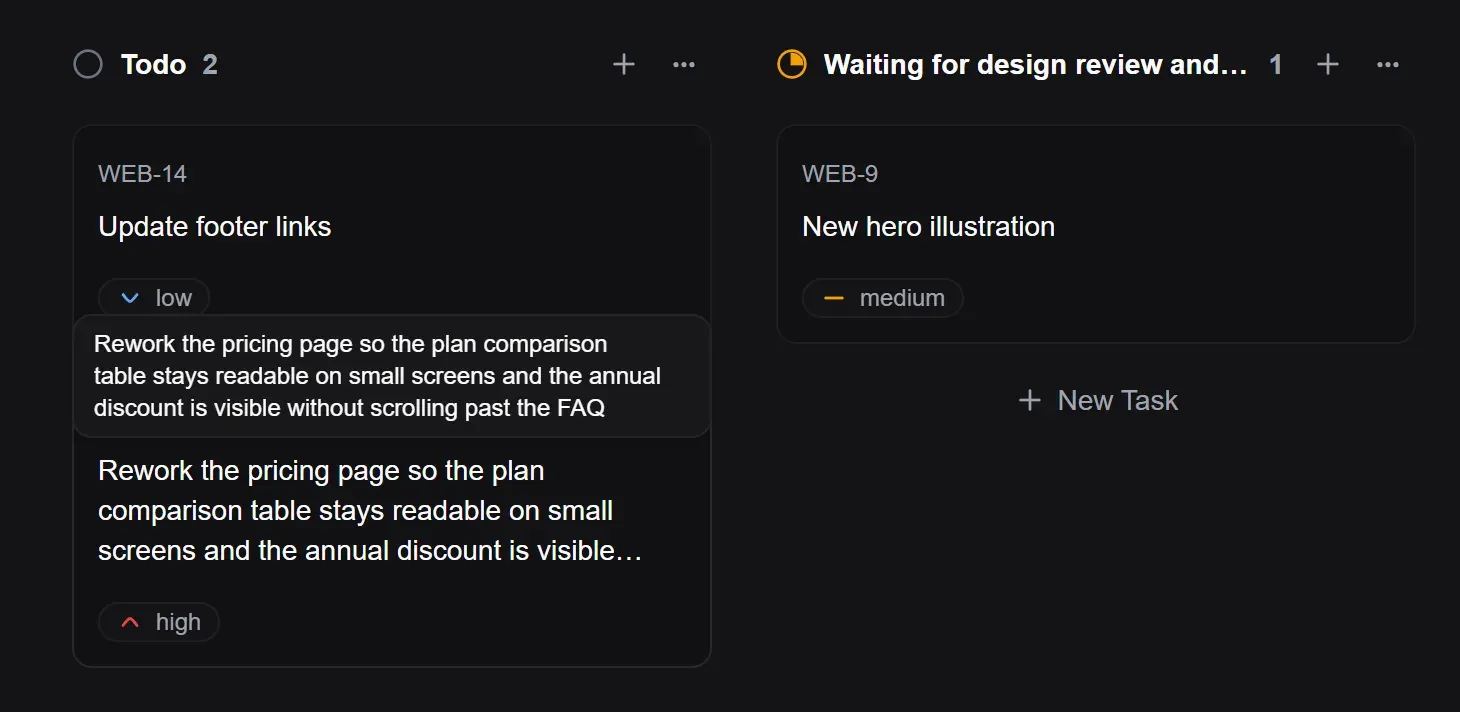
Long names in full on hover: Task titles and status names cut off on the board now show in full when you hover over them. The task count next to a long status name always stays visible.
Cycles update live: A cycle’s page updates as soon as tasks are added to it, moved out, changed or deleted, by you in another tab or by your teammates. No more reloading.
Proper punctuation as you type: Task descriptions and comments turn straight quotes into curly ones, -- into a dash and ... into an ellipsis. With Elean in Polish you get Polish quotes („…”). Code is left exactly as you typed it.
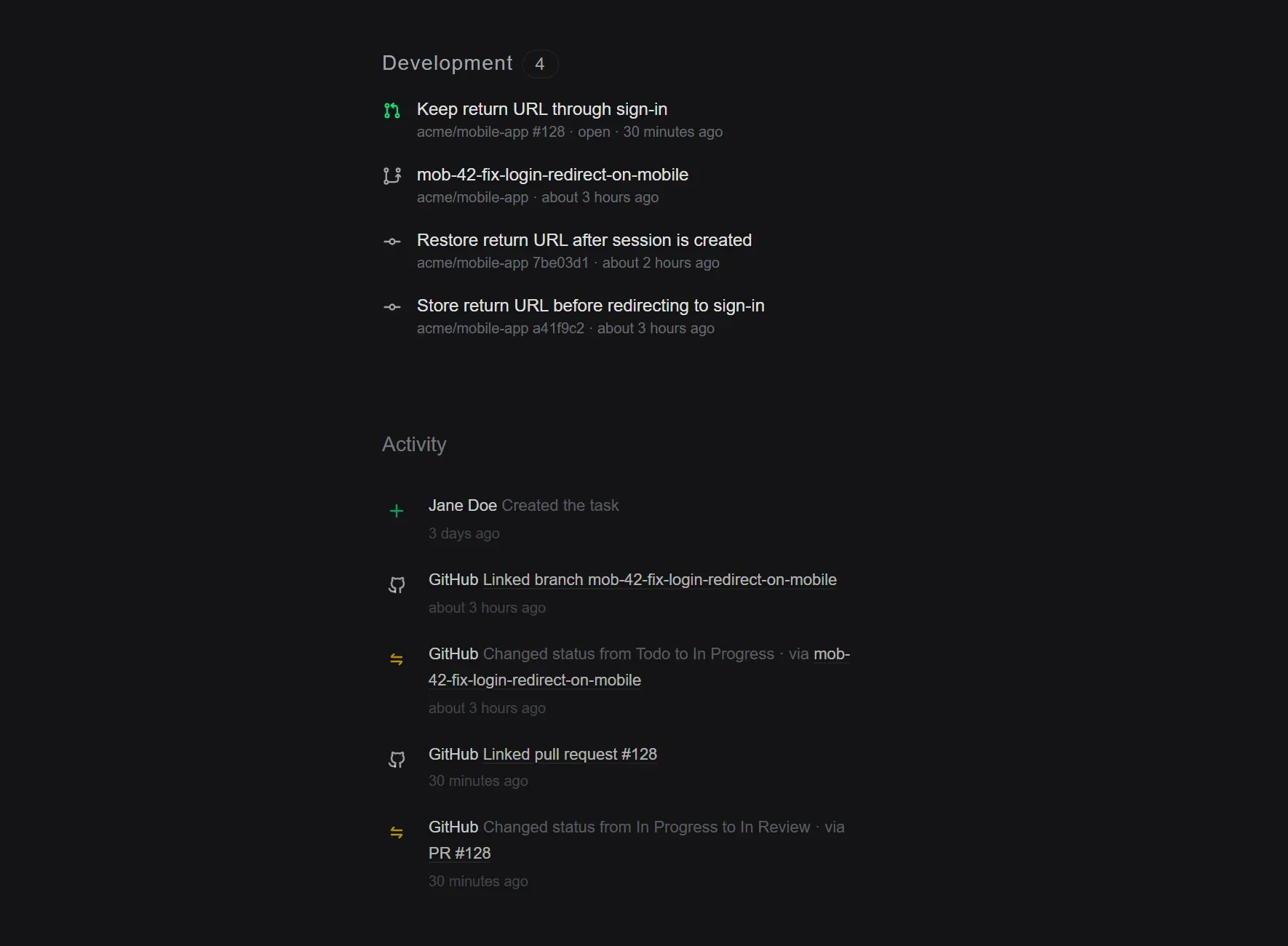
Easy to spot what GitHub did: Notifications and emails about changes made by GitHub now show the GitHub logo next to them.
Lighter task lists in the MCP server: AI assistants connected to Elean get a short summary of each task when they list a project, so they can go through many more tasks at once. They still open the full task when they need the details.
Fixed
Integrations sign their changes: Tasks created or updated through the API now show the API key’s name in your inbox and emails, instead of placeholder text or “Someone”, and the email takes you straight to the task.
Public roadmaps show only main tasks: Subtasks no longer appear as separate cards on a public roadmap.
Connect GitHub to see the pull requests, branches and commits behind every task, and let tasks move on their own as work gets merged.
New
Your code, right on the task: Mention a task’s key, like MOB-42, in a branch name, pull request or commit, and it shows up on that task with its current state. The task’s activity shows what happened on GitHub and when.
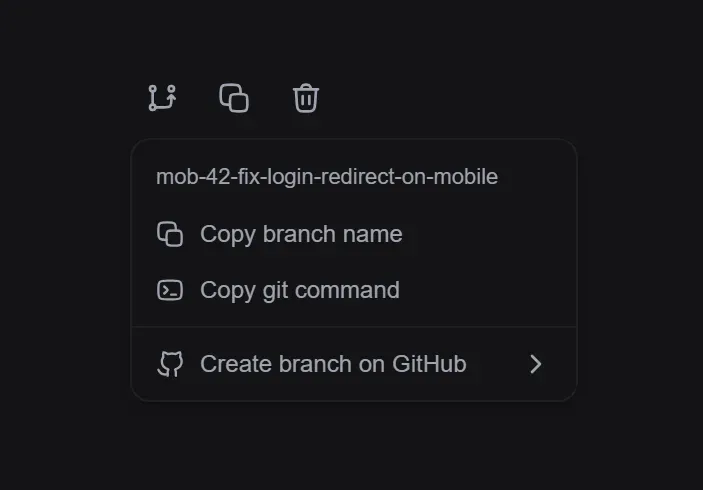
Start a branch in one click: Copy a ready-made branch name or git command from any task, or create the branch on GitHub straight away.
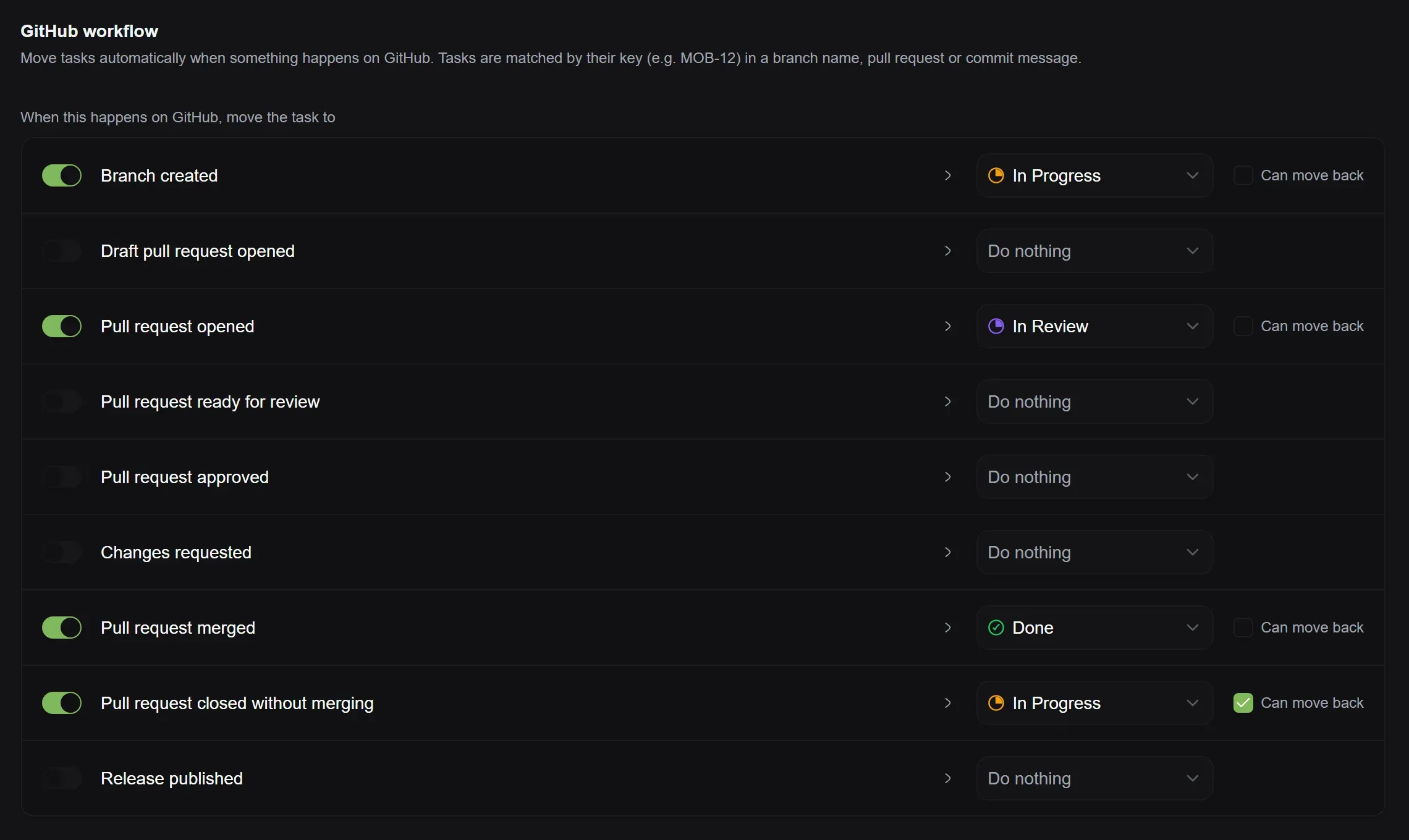
Tasks that move themselves: Choose what happens when a branch is created, a pull request is opened, approved or merged, or a release is published, and Elean moves the task to the right status for you.
The Free plan includes one repository and two rules. Pro and Business have no limits and can also move tasks when a release is published.
Coming next
We’re working on GitLab, with Forgejo and Gitea to follow.
Missing an integration? Tell us which tools you’d like Elean to connect to, on Discord or through live chat in the app.
See how every project and cycle is doing at a glance, and open any cycle to check whether it will finish on time.
New
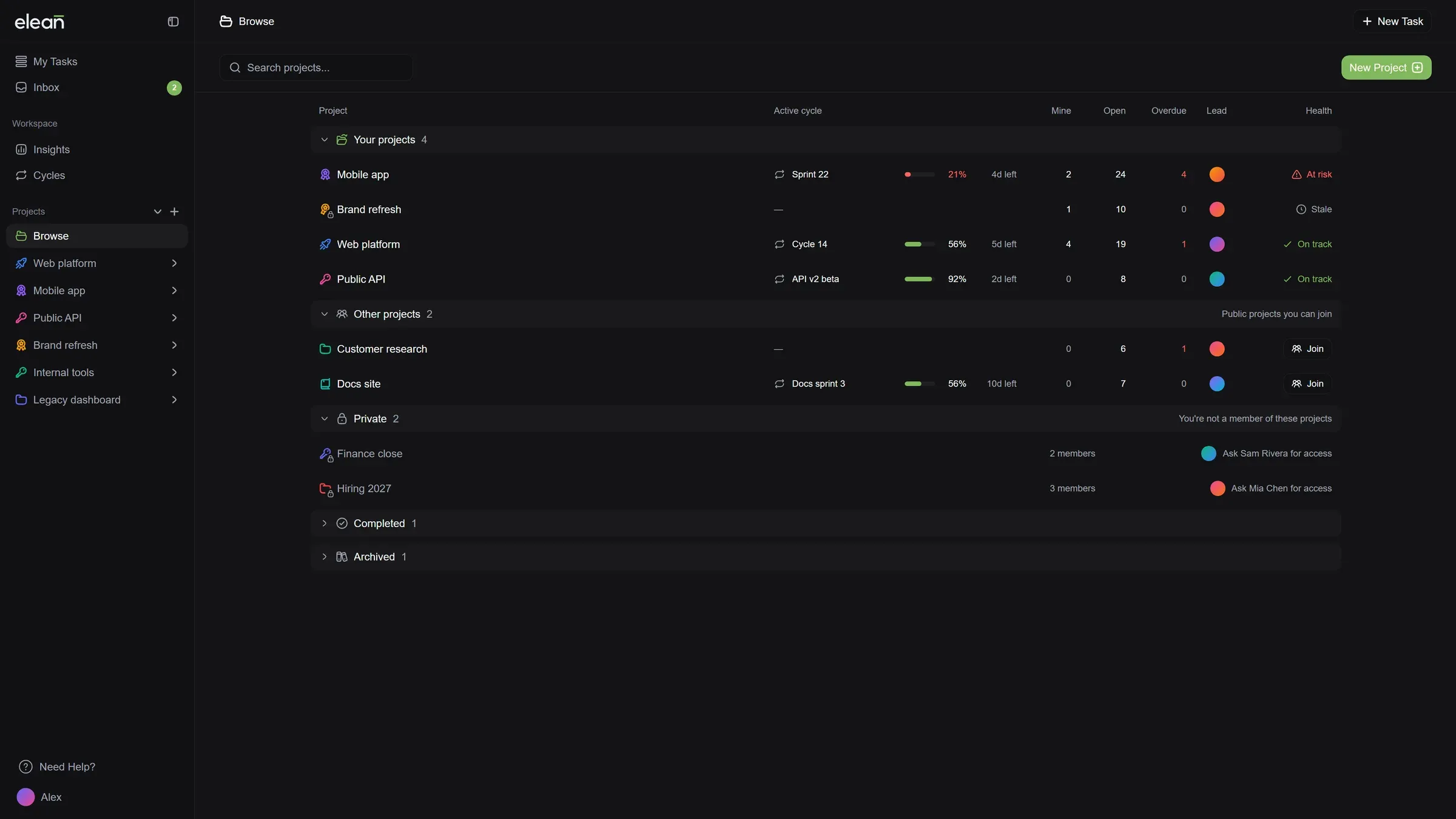
A new Projects page: Projects are grouped into yours, ones you can join, and completed or archived. Each row shows the current cycle with its progress and days left, your open tasks, what’s overdue, who leads it, and whether it’s on track.
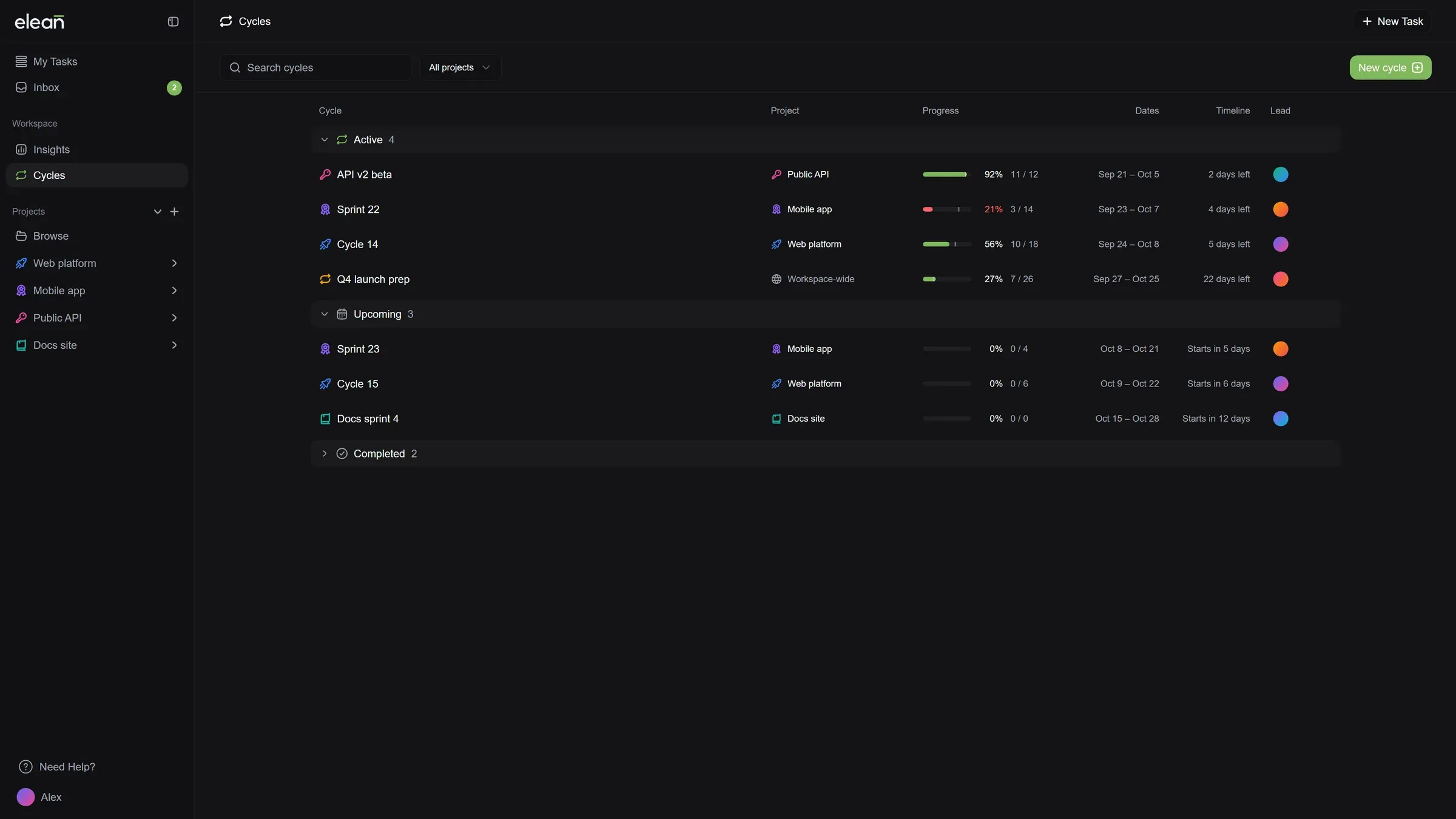
A new Cycles page: Every cycle shows its project, progress and days left, and cycles falling behind are marked so you can catch them early. The Cycles tab in each project works the same way.
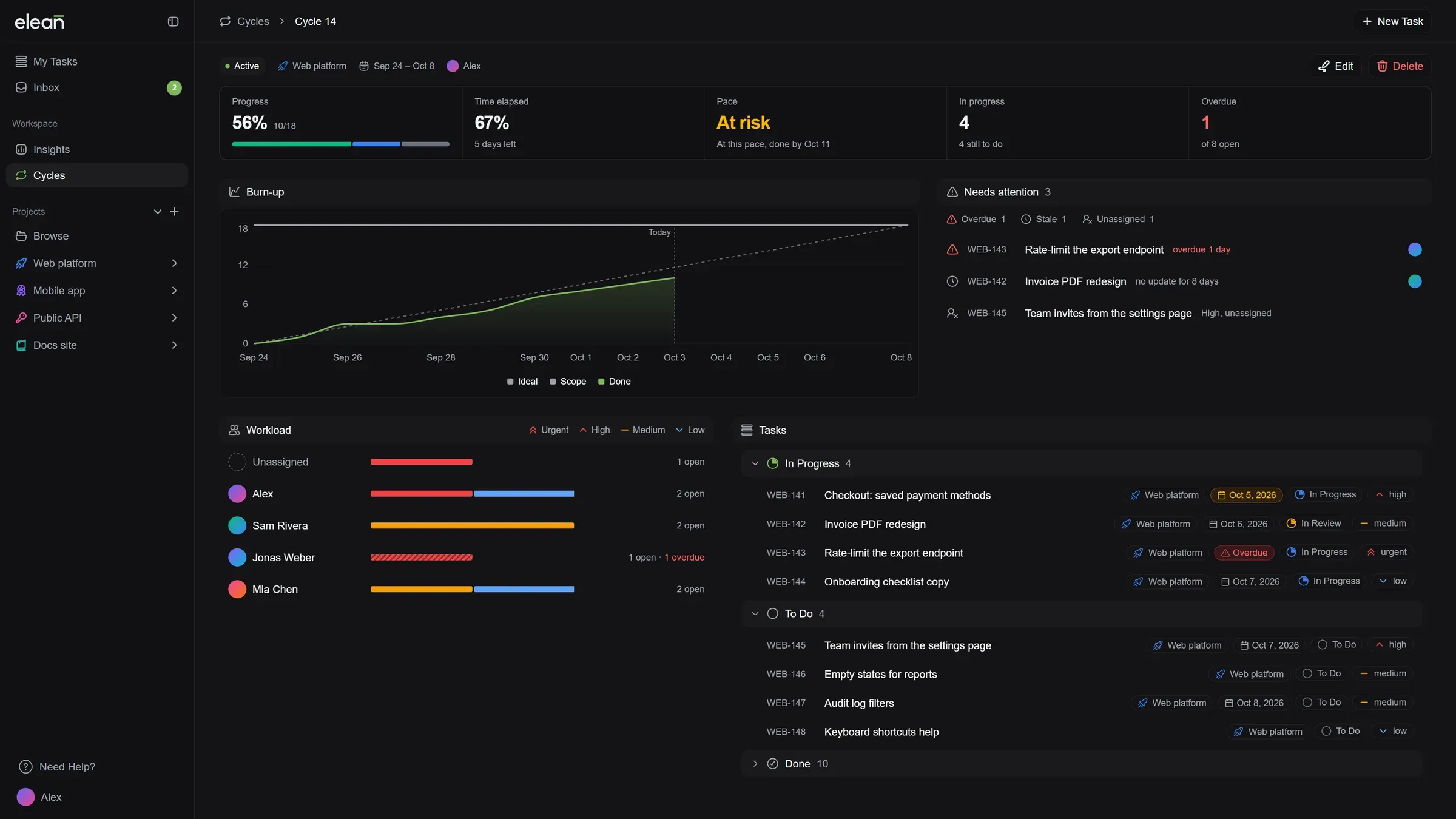
A page for every cycle: Open a cycle to see whether it will finish on time, what needs attention, who’s working on what, and all of its tasks in one place.
Cycles and files in the MCP server: AI assistants connected to Elean can now see your cycles, check what’s attached to a task, and attach files of up to 5 MB.
Improved
Look before you join: Open any public project to see its tasks before you join it.
Know who to ask: Private projects you’re not part of show who leads them, so you know who to ask for access.
Cleaner subtasks in the list: Subtasks shown under their parent get a small marker instead of a repeated “Subtask” label. Elsewhere, a subtask shows which task it belongs to.
A helpful My Tasks when it’s empty: With nothing assigned yet, My Tasks helps you create your first task or find a project to join. Once you’ve finished everything, it tells you you’re all caught up.
Fixed
Private projects stay private: People outside a private project no longer see its members or description.
Joining a project confirms when it’s done: The confirmation now appears once you’ve actually joined, and you see a message if it didn’t work.
My Tasks now shows what's overdue, what's due today and what's next, and Insights show how work is moving across your workspace and projects. Plans are now Free, Pro and Business, with Enterprise on request, and the billing page shows your seats, storage and renewal at a glance.
New
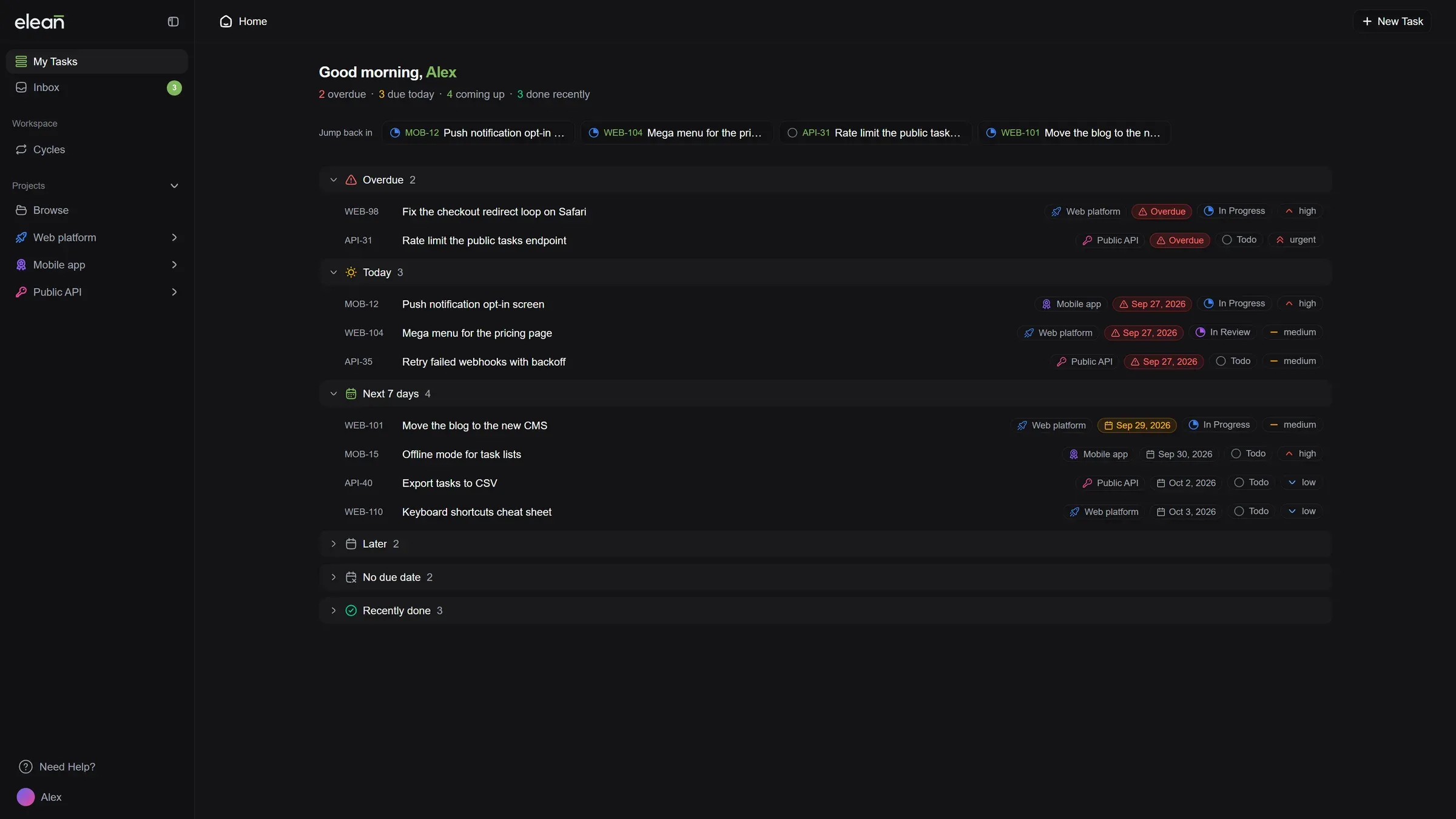
My Tasks, organized by when things are due: Your tasks are grouped into Overdue, Today, Next 7 days, Later, No due date and Recently done, with a short summary of your day at the top. Jump back into the tasks you opened last in one click.
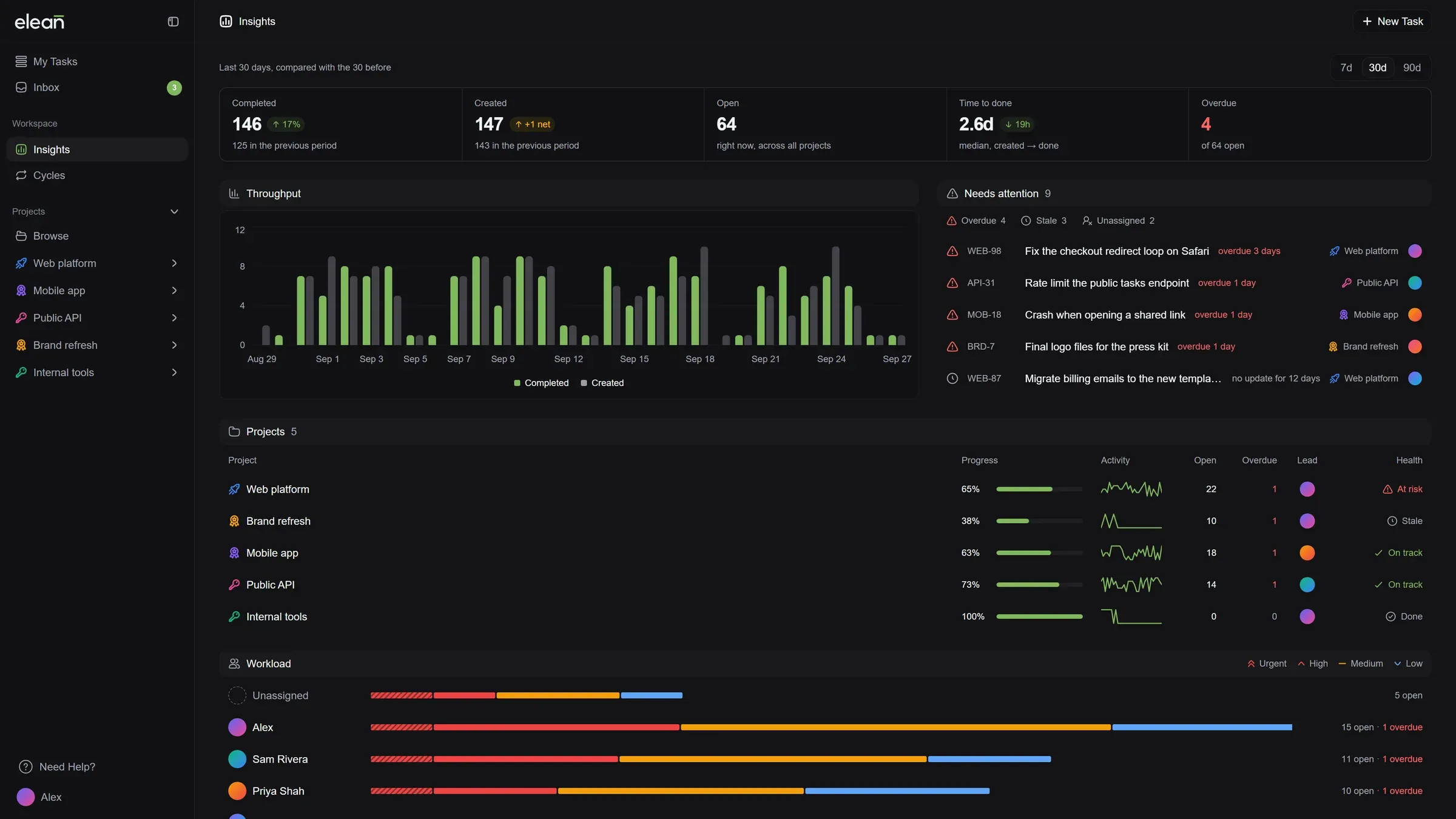
Insights for your workspace: Analytics is now Insights. See what got done and what was added compared with the previous period, which tasks need attention, which projects are at risk or stalled, and who has the most on their plate.
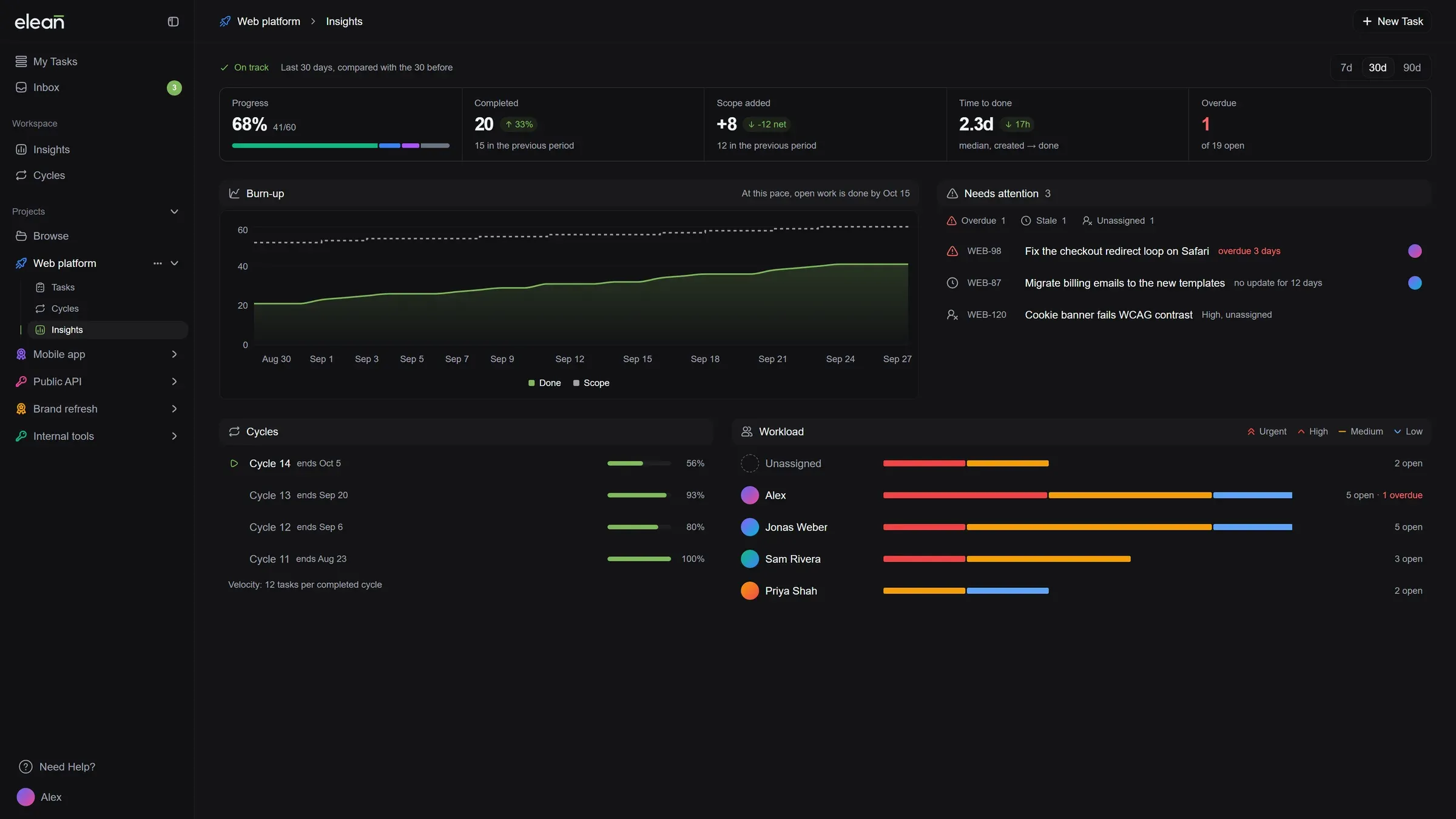
Insights for every project: Follow a project’s progress, see when open work is likely to be done at the current pace, and check how its cycles are going.
Free, Pro and Business: Our plans have names that tell you where they sit. Stream is now Free and River is now Pro, with the same price and limits, so nothing changes for you.
Business for larger teams: 50 members, unlimited storage, a public roadmap, 180 days of audit history and priority support, for $65 a month or $55 a month billed yearly. Guest access is coming soon.
Enterprise on request: Need custom seats, invoicing or a security review? Talk to us from the plans page.
A new billing page: See your plan, how many seats you use and how much storage is left at a glance. Your renewal date, card and billing contact sit together on the right.
Improved
Projects open on your tasks: Opening a project takes you straight to its tasks. Its charts now live under Insights.
Picking a plan is easier: Plans sit side by side next to a running total. Add seats with a plus and minus, and open a full comparison of every feature in one click.
Your whole payment history: Load older payments whenever you need them, see how each one was paid, and download any invoice.
Checkout finishes on its own: After you pay, Elean waits for your new plan to switch on and takes you straight to it. If a payment doesn’t go through, you see why, and you’re not charged.
Fixed
Yearly plans show the right price: The billing page showed a monthly amount as the yearly price. It now shows what you actually pay each year.
AI limits show the right window: The billing page said AI requests reset every month. They reset every 24 hours, and the page now says so.
Scheduled plan changes are easy to read: A plan change set for your next renewal now shows the plan’s name.
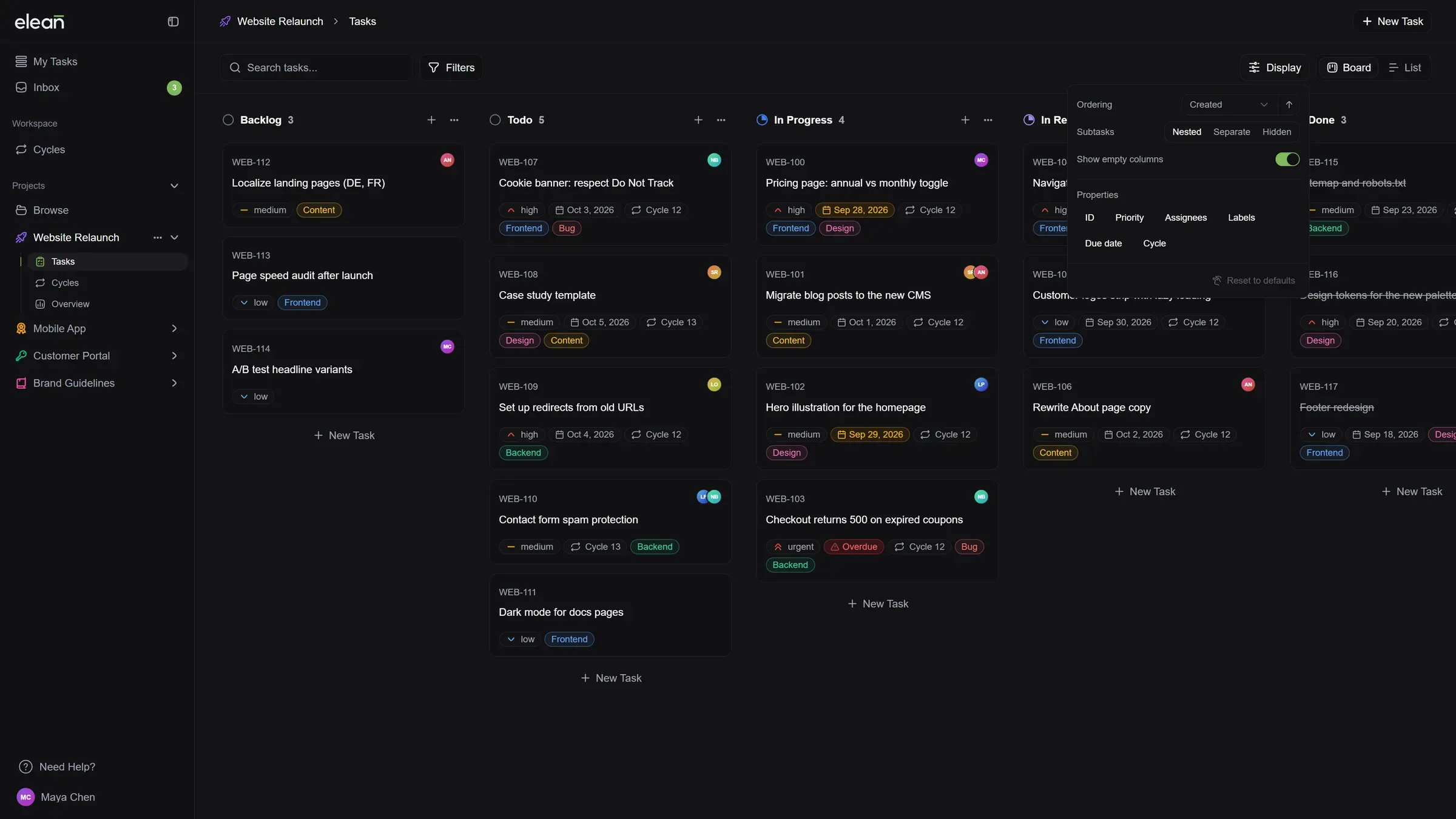
See tasks grouped by status, update several at once, and choose what your board shows. Drag and drop, the sidebar and page loads feel smoother too.
New
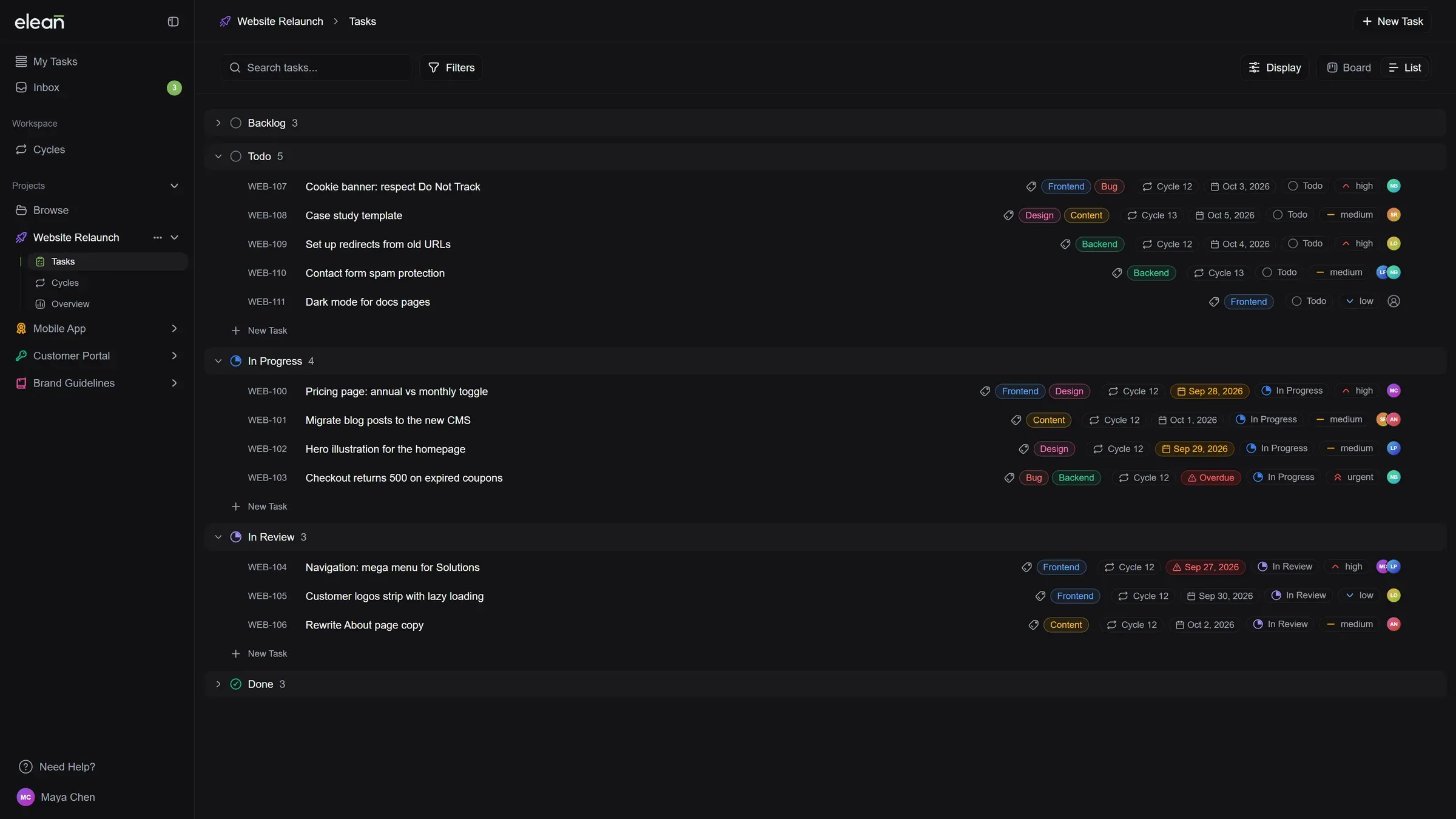
A new List view replaces the Table: Tasks are grouped by status, and you can fold away any group you don’t need. Change status, priority, labels or assignees right from the row.
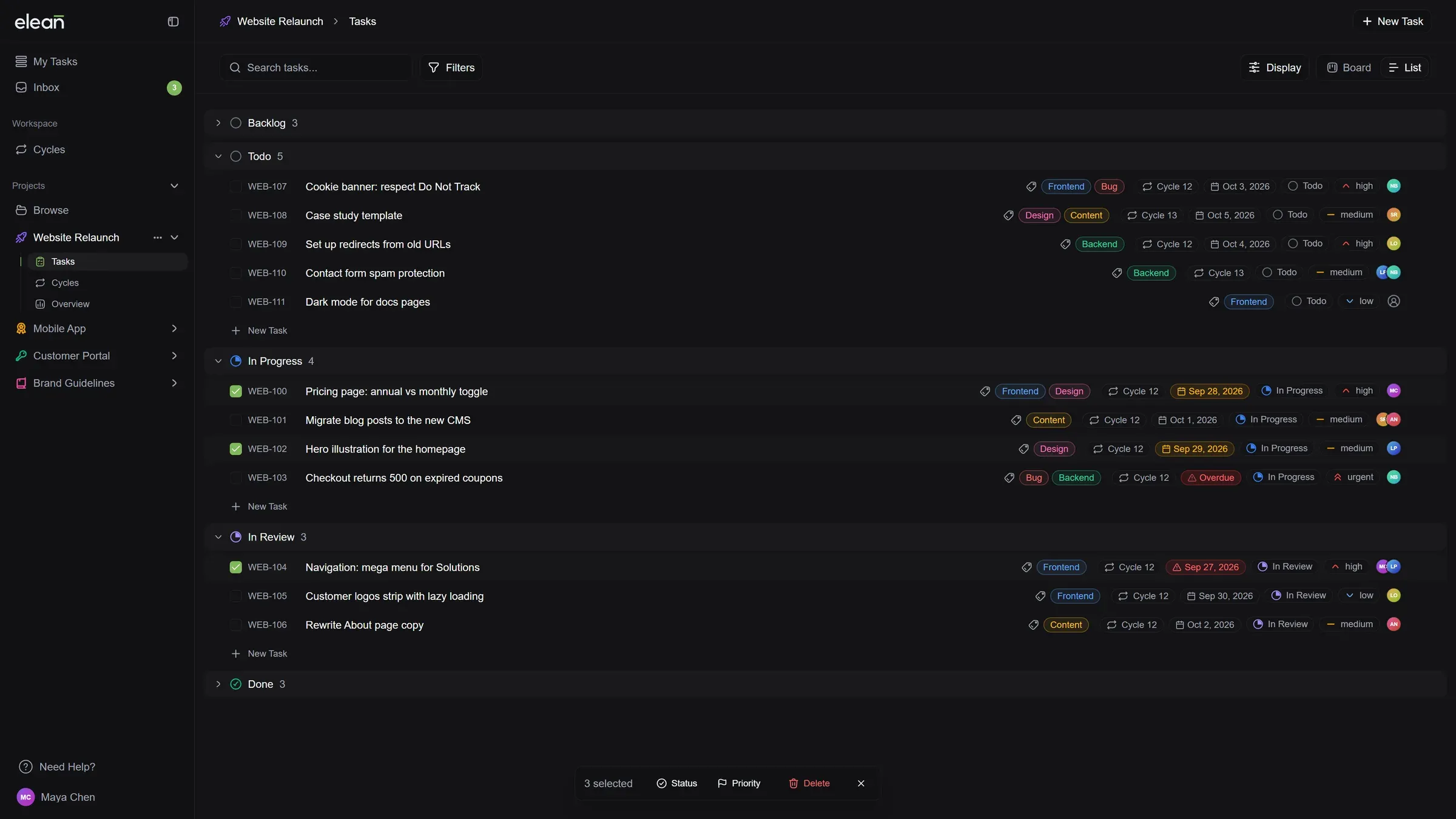
Update many tasks at once: Select several tasks in the List to change their status or priority, or delete them, in one go.
Set up your board your way: A new Display menu picks the order of tasks, which details show on cards and in the list, and whether empty columns take up space. The List can also drop the status groups and show one long list. Each project remembers its own setup.
Subtasks, the way you like them: From the same Display menu, keep subtasks inside their parent card, show them as cards of their own with a link back to the parent, or hide them.
Improved
Change a subtask’s status from its parent: The subtask list on a card now has the same status picker as the list.
Projects unfold in the sidebar: Click a project to see its Tasks, Cycles and Overview right below it. The sidebar remembers what you left open, and Archive and Settings are in the project’s “…” menu.
You always know where you are: The top bar shows the project and the view you’re in.
One view switcher everywhere: Switching between Board and List, or List and Grid, works the same way on every page.
Pages load smoothly: Screens fade in from their loading state instead of flashing, on the board, projects, cycles, the inbox and My Tasks. Switching between Board and List is smooth too.
Clear answers on an empty board: When a search or filter finds nothing, the board says so and lets you clear it in one click. A new project shows where to add its first task.
Find your own tasks faster: In the Assignee filter, “Me” is now at the top of the list, so you don’t have to look for your name.
Column sorting in your language: The sort menu on board columns is translated and shows which order is active.
Fixed
Smoother drag and drop on the board: Moving a card to another column no longer flickers. The card glides into its new place.
The board no longer shifts while loading: The loading screen now matches the board it turns into.
New accounts now start on a board with example tasks and a short list of what to do first, instead of an empty screen — task updates now say what actually changed, in activity, in your inbox and by email.
New
Your first board comes with work on it: A new workspace used to open empty, on the one screen that is empty by definition for a new account. Signing up now lands you on a real board, in a project that already holds nine example tasks — each one showing something the board does: subtasks, labels, priorities, checklists, code blocks, connecting an AI agent. Delete them whenever you like. Every workspace also starts with six labels, so the label picker is no longer empty the first time you open it.
The wait after signup shows what is happening: Creating a workspace takes a few seconds on the server. Instead of a blank screen, you now see a board assembling itself while it runs, and the real board fades in once its content is ready rather than over a set of skeletons.
A short list of what to do first: A new workspace now gets a Getting Started card in the sidebar with the handful of things worth doing on day one — create a task, move one to another status, assign one, invite someone. It ticks items off from what you actually do rather than from clicking them, and it shows only the steps your role allows, so people joining an existing workspace by invitation get it too. Close it whenever you like; it leaves on its own once the list is done.
Improved
Task updates reach your inbox and your email again: Changing a task’s title, description, due date, labels or cycle sent nothing at all — no email, no notification — even though the settings screen has had switches for both the whole time. Those switches now do what they say. The notification and the email name the fields that changed and show the old value struck through next to the new one, and the description is diffed word by word. A rewritten description is named rather than pasted in full.
The digest email says what happened: When several things happen close together they arrive as one summary email. That summary listed only who touched what — “updated priority”, with no mention of which priority. Every row now carries the same detail as a single notification, including status and priority changes, which had the values available all along.
Activity shows what changed, not just that something did: Editing a task’s description left a line in the activity feed that read “Changed description” and nothing else — the old and new text were recorded, just never shown. The feed now renders the change itself: removed words struck through, new words alongside them. Title changes read the same way, old title through, new one after it. Long untouched passages collapse to a few words of context so the edit stays easy to find, and a description rewritten from scratch says so rather than dumping two versions side by side.
Due date changes read as dates: A due date change in the activity feed used to print the raw stored timestamp, so it said “from 2026-05-13T22:00:00.000Z to 2026-09-23T22:00:00.000Z”. It now shows the same date format as the rest of the app, and a date being added or cleared reads as such.
Skipping the invite step is an actual option: The last step of onboarding asked you to invite your team with no clear way past it. Skip is visible now, and the sign-in options sit side by side rather than stacked.
Fixed
Tasks no longer vanish or show up twice: Long lists are loaded a page at a time, and tasks with the same priority or creation time had no fixed order between those pages — so a task could arrive in two pages and another in none. The duplicate cards were the visible half of it; the missing tasks were the half nobody could see. This covered the board, My Tasks, the public share link and the Public API.
Cycle progress stops moving backwards: A task counted as completed on the day it was last edited, not the day it was closed — so renaming or relabelling a finished task pushed it forward and a burndown chart could climb. Completion is recorded when it happens now.
An interrupted signup no longer costs you the account: Reloading the page during “Creating your workspace” could leave the account half-created, with no way to finish or retry. The workspace now picks up where it left off.
Deleting a project takes you back to your projects: Deleting a project dropped you onto a workspace that does not exist, so you landed on a broken page instead of the project list.
Attachments delete through the Public API: Removing an attachment through the API did not go through.
Your role comes back if a change fails: When changing a workspace member’s role failed partway, the member could be left with the wrong role instead of the one they started with.